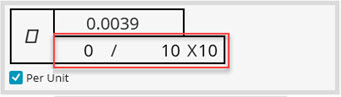
The Per Unit check box on the Feature Control Frame tab in the XactMeasure GD&T dialog box (Insert | Dimension | <dimension>) appears for flatness and straightness dimensions. Use it to specify a flatness per unit area or a straightness per unit length.
When you mark the Per Unit check box, PC-DMIS changes the Feature Control Frame Editor area by adding an additional line where you can enter a tolerance value as well as the unit area or unit length values:
Feature Control Frame Editor (per unit flatness)
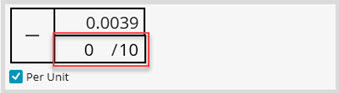
Feature Control Frame Editor (per unit straightness)
PC-DMIS now automatically uses a step increment that ensures that the "per unit window" includes maximum overlap as it "slides" over all the point data.
 Per
Unit Flatness Overlap Details:
Per
Unit Flatness Overlap Details:
Once you enter the desired information and create the Feature Control Frame (FCF), PC-DMIS also applies the flatness per unit area or straightness per unit length in the FCF:
For example, a flatness FCF with an overall flatness tolerance of .05 and a per unit tolerance of .01 per unit area of 10 x 10 would look like this:
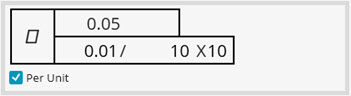
Example of a Finished Per Unit Flatness FCF
For example, a straightness FCF with an overall straightness tolerance of .0254 with a per unit tolerance of .012 / per unit length of 10 would look like this:
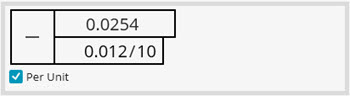
Example of a Finished Per Unit Straightness FCF
PC-DMIS also supports the "square area" symbol that was added in the Y14.5 2009 standard. This symbol indicates when the area is exactly square, which means that the width and length values of the per unit area are identical. To use this symbol, select the <UA> field and choose the Square Area symbol from the list:
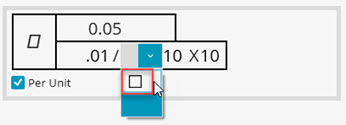
Example of Selecting the Square Area Symbol
The FCF appears as follows. The square area symbol indicates that the per unit area value following it has an identical width and length (in this case the 10 meaning a 10 X 10 area):
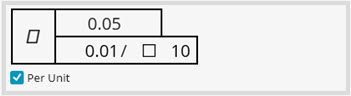
Example of a Finished Per Unit Flatness FCF with Square Area Symbol
The square area symbol also appears in your report output.
