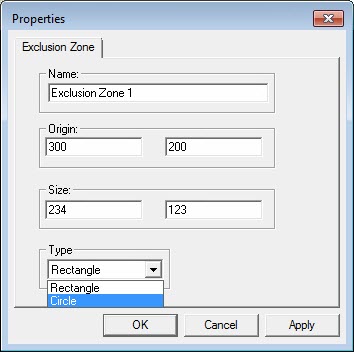
Properties dialog box - Exclusion Zone
Exclusion zones define the XY fixturing area where no measurement activity should be performed. For example, the area that equipment, such as a tool changer, occupies should be excluded to avoid collisions in that area. The 2D XY zone is extended infinitely in the Z+ and Z- directions.
Name - Use the default name, or change it to a name of your choice.
Origin - Defines the XY coordinates of the corner of the defined area.
Size - The first value represents the X dimension. The second value represents the Y dimension.
Type - You can define either a rectangular or circular area. For a circular area, define the center and the radius of the area.
Click Apply to apply any changes that you made for this exclusion zone.
Click OK when you are done changing all fixture properties.