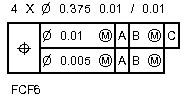
The Composite check box on the Feature Control Frame tab in the XactMeasure GD&T dialog box (Insert | Dimension | <dimension>) controls whether or not the primary dimension row and secondary dimension row should use the same symbol in a single merged cell that spans both rows.
When you select the Composite check box, the Feature Control Frame becomes a composite callout. In a composite callout, the symbol spans across the rows, like this:
If you clear the Composite check box, the primary and secondary rows display as multiple single segments. Each segment has its own separate symbol, even if the symbol represents the same thing on both rows, like this:
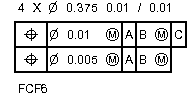
The ASME Y14.5 - 2009 Geometric Dimensioning and Tolerancing describes the differences in interpreting these conditions.