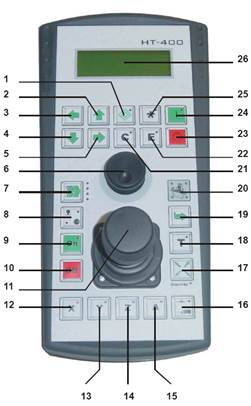
HT400 Jog Box
The SB-Elektronik jog box connects to the SB-Elektronik controller which sends scan codes to PC-DMIS.
SB-Elektronik HT400 Jog Box
| No. | SB-Elektronik HT400 Key Function | PC-DMIS Function |
| 1 | Input Control | Insert Move |
| 2 | Input Control (Shift Key) | |
| 3 | Input Control | |
| 4 | Input Control | |
| 5 | Input Control | |
| 6 | Handwheel + Button (Sensor 5) | |
| 7 | Switch the Speed Stages | |
| 8 | Switching between Joystick and Manual Wheel | |
| 9 | Output Stage ON | |
| 10 | End Stage OFF | |
| 11 | Joystick + Button Optional (Sensor 4) | |
| 12 | ON/OFF Axis X | |
| 13 | ON/OFF Axis Y | |
| 14 | ON/OFF Axis Z | |
| 15 | ON/OFF Axis A | |
| 16 | Halve the Set Speed | |
| 17 | Operation Enable for HT | |
| 18 | Accept Restart Point | |
| 19 | Switch the HT Position | |
| 20 | Display the HT Position | |
| 21 | Input Control | Clear / Erase |
| 22 | Input Control | End/Enter |
| 23 | Stop Traversing Record | Hold |
| 24 | Start Traversing Record | Measure |
| 25 | Input Control | Cancel |
| 26 | Display |
Wenzel HT400 Jog Box
The Wenzel HT400 jog box connects directly to the computer through a serial port which then sends scan codes to PC-DMIS.
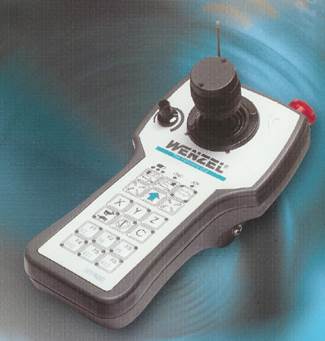
Wenzel HT400 Jog Box
| Wenzel HT400 Key | PC-DMIS Function |
| X | |
| Y | |
| Z | |
| | | |
| C | |
| F1 | End / Enter |
| F2 | Clear / Erase |
| F3 | Insert Move |
| F4 | Measure (or N/A) |
| F5 | Cancel |
| F6 |