The default Leica tracker toolbars are shown in the links below. These are available when you launch PC-DMIS Portable using a Leica tracker interface.
To view documentation on these items in PC-DMIS, position your mouse pointer over the appropriate menu item, and when the tooltip appears, press F1.
Tracker Operation toolbar (for AT-901 Trackers)
 Click
to view the Tracker Operation menu items for the AT-901
Tracker:
Click
to view the Tracker Operation menu items for the AT-901
Tracker:

Tracker Operation toolbar (for AT-930/960, AT-40x and ATS600 Trackers)
Click
to view the Tracker Operation menu items for the AT-930/960,
AT-40x, and ATS600 Trackers:

Tracker Operation toolbar (for LAS, LAS-XL and T-Scan Trackers)
Click
to view the Tracker Operation menu items for the LAS, LAS-XL,
and T-Scan Trackers:
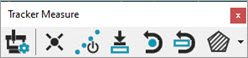
Tracker Measure
Click
to view the Tracker Measure menu items:

Tracker Nivel