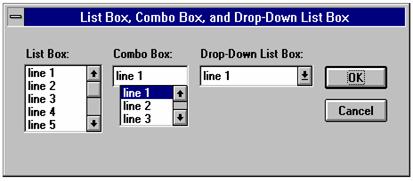
You can use a list box, drop-down list box, or combo box to present a list of items from which the user can select. A drop-down list box saves space (it can drop down to cover other dialog box controls temporarily). A combo box allows the user either to select an item from the list or type in a new item. The items displayed in a list box, drop-down list box, or combo box are stored in an array that is defined before the instructions that define the dialog box.
Sub Main
Dim MyList$ (5)
MyList (0) = "line Item 1"
MyList (1) = "line Item 2"
MyList (2) = "line Item 3"
MyList (3) = "line Item 4"
MyList (4) = "line Item 5"
MyList (5) = "line Item 6"
Begin Dialog BoxSample 16,35,256,89,"List Box, Combo Box, and Drop-Down List Box"
OKButton 204,24,40,14
CancelButton 204,44,40,14
ListBox 12,24,48,40, MyList$( ),.Lstbox
DropListBox 124,24,72,40, MyList$( ),.DrpList
ComboBox 68,24,48,40, MyList$( ),.CmboBox
Text 12,12,32,8,"List Box:"
Text 124,12,68,8,"Drop-Down List Box:"
Text 68,12,44,8,"Combo Box:"
End Dialog
Dim Dlg1 As BoxSample
Button = Dialog ( Dlg1 )
End Sub