


 Description
You can use the ToleranceCommand object to automate Geometric Tolerances commands inside of PC-DMIS.
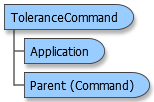
Object Model
Example
This short example shows how to read through and list the features and segments of a Geometric Tolerance command.
| Example (Visual Basic) |  Copy Code Copy Code |
|---|---|
Dim DmisApp As Object Dim DmisPart As Object Dim Commands As Object Dim Command As Object Dim ToleranceCommand As Object Dim i As Integer Sub Main Set DmisApp = CreateObject("PCDLRN.Application") Set DmisPart = DmisApp.ActivePartProgram Set Commands = DmisPart.Commands For Each Command In Commands If Command.IsToleranceCommand Then Set ToleranceCommand = Command.ToleranceCommand MsgBox ToleranceCommand.ID & " " & ToleranceCommand.SegmentCount & " " & ToleranceCommand.FeatureCount & " " & ToleranceCommand.SpecificationString For i = 1 To ToleranceCommand.FeatureCount MsgBox ToleranceCommand.FeatureID(i) & " " & ToleranceCommand.DatumFosId(i) Next i Set ToleranceCommand = Nothing End If Next Command Set Commands = Nothing Set DmisPart = Nothing Set DmisApp = Nothing End Sub | |