
The DimensionInfo object acts as a container to hold individual dimension information in your report.
How to Use in a Label Template
From the Label Template editor's Object Bar, you can add and size a DimensionInfo object. Once you save the label template, you can use the Rule Tree Editor dialog box for a new or an existing report template to specify the dimensions for which PC-DMIS calls and displays that label template. For information on how to use the Rule Tree Editor dialog box, see the "About the Rule Tree Editor" topic in this chapter.
How to Use in a Custom Report
From the Custom Report editor's Object Bar, you can drag and drop a DimensionInfo object into the editor's canvas. The Dimension Info dialog box opens so that you can choose a dimension to associate with the object.
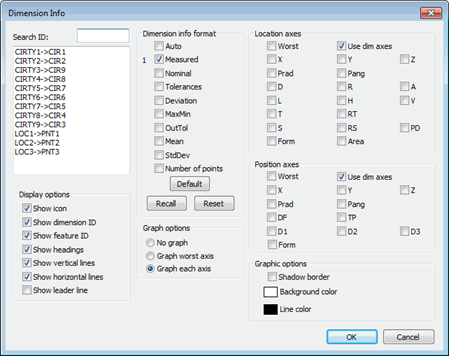
Dimension Info dialog box
From the dialog box, you can choose the dimension from the dimension list. Once you click OK, PC-DMIS displays a table on your report that contains the dimension information.
For complete information on how to use this dialog box to display dimension information, see "Inserting Dimension Info Boxes" in the "Inserting Report Commands" chapter.
Below are the properties specific to this object:
For most properties, you can set them from the Dimension Info dialog box. You can open this dialog box at any time with the (Settings Dialog) property.
DimID
Defines the feature or dimension ID containing the hits that you want to
display.
GraphOption
Defines if the graph is displayed and what it shows. The value can be one
of the following numbers:
0
- Hides the graph.
1 - Graphs the worst axes.
2 - Graphs each axis.
LocOrderA
A value greater than 0 displays the A location axis and orders it according
to the value given.
LocOrderAR
As above, except the AR (Area) axis is displayed and ordered.
LocOrderD
As above, except the D axis is displayed and ordered.
LocOrderForm
As above, except the Form axis is displayed and ordered.
LocOrderH
As above, except the H axis is displayed and ordered.
LocOrderL
As above, except the L axis is displayed and ordered.
LocOrderPAng
As above, except the Polar Angle axis is displayed and ordered.
LocOrderPD
As above, except the PD axis is displayed and ordered.
LocOrderPRad
As above, except the Polar Radius axis is displayed and ordered.
LocOrderR
As above, except the R axis is displayed and ordered.
LocOrderRS
As above, except the RS axis is displayed and ordered.
LocOrderRT
As above, except the RT axis is displayed and ordered.
LocOrderS
As above, except the S axis is displayed and ordered.
LocOrderT
As above, except the T axis is displayed and ordered.
LocOrderUseDimAxes
As above, except only the dimension axes for the location are displayed.
LocOrderV
As above, except the V axis is displayed and ordered.
LocOrderWorst
As above, except the Worst axis of the location is displayed.
LocOrderX
As above except the X axis is displayed and ordered.
LocOrderY
As above, except the Y axis is displayed and ordered.
LocOrderZ
As above, except the Z axis is displayed and ordered.
OrderAuto
A value greater than 0 displays and orders the default information automatically.
OrderDeviation
As above, except the deviation value is displayed and ordered.
OrderMaxMin
As above, except the maximum and minimum values are displayed and ordered.
OrderMean
As above, except the average of all the deviations is displayed and ordered.
OrderMeasured
As above, except the actual measured dimensions are displayed and ordered.
OrderNominal
As above, except the nominal values are displayed and ordered.
OrderNumberPoints
As above, except the number of points used to measure the feature or dimension
are displayed and ordered.
OrderOutTol
As above, except the out of tolerance value is displayed and ordered.
OrderStdDev
As above, except the standard deviation is displayed and ordered.
OrderTolerances
As above, except the tolerances are displayed and ordered.
ShowDimensionID
A value of 1 displays the dimension ID. A value of 0 hides it.
ShowFeatureID
A value of 1 displays the feature ID. A value of 0 hides it.
ShowHeadings
A value of 1 displays the row and column headings. A value of 0 hides it.
TPOrderD1
A value greater than 0 displays and orders the diameter/width value of
the first datum.
TPOrderD2
As above, except the second datum is displayed and ordered.
TPOrderD3
As above, except the third datum is displayed and ordered.
TPOrderDF
As above, except the diameter of the feature is displayed and ordered.
TPOrderForm
As above, except the integrated form dimension is displayed and ordered.
TPOrderPA
As above, except the Polar Angle of the position is displayed and ordered.
TPOrderPR
As above, except the Polar Radius of the position is displayed and ordered.
TPOrderTP
As above, except the position tolerance and its associated deviation are
displayed and ordered.
TPOrderUseDimAxes
As above, except only the position dimension axes are displayed.
TPOrderWorst
As above, except only the worst axis of the position is displayed.
TPOrderX
As above, except the X axis of the position is displayed and ordered.
TPOrderY
As above, except the Y axis of the position is displayed and ordered.
TPOrderZ
As above, except the Z axis of the position is displayed and ordered.