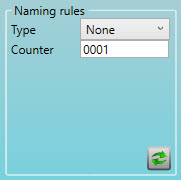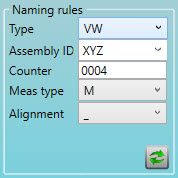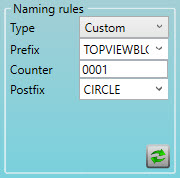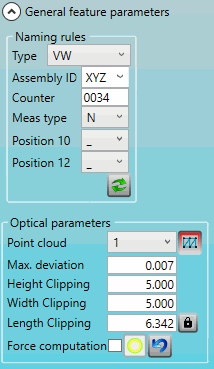
You can use the options in the General feature parameters group to define the general parameters for a Flush or Gap feature. The available options depend on what you select for the Type option:
None - Only the Counter list is available.
VW - These options are available:
Assembly ID
Counter
Meas type
Alignment
Custom - These options are available:
Prefix
Counter
Postfix
For details on these options, see "Completing the CAD Selection Group for a Flush and Gap Feature" in this documentation.
The following graphics show the options for each feature.
MA, MB, MC, MD, and NA Features:
Descriptions
The following table describes the options.
For descriptions of the icons that appear in this group, see "Using the Icons".
Item |
Description |
|---|---|
Naming Rules area |
Type list: Select the type of naming rule:
Counter box: Type an integer value for the feature counter. The maximum value is four digits. The Counter box is available for all three Type options, and it is the only option when you select None from the Type list. PC-DMIS increments the Counter value by one each time you create a feature. The following options appear when you select the VW type:
These options replace the Alignment list when you select N from the Meas type list: Position 10 list: Select the vehicle coordinate system for the VW naming rule. Position 12 list: Select the alignment area for the VW naming rule. Select the alignment area for the VW naming rule: These options appear when you select the Custom type:
|
Optical parameters area |
Pointcloud list: Select the pointcloud from which you want to extract the feature. Max. deviation box: Type the maximum deviation between two points in the COP. If two points have a higher deviation, the extraction fails. Height Clipping box: Type the value to define the height of the yellow clipping box. Width Clipping box: Type the value to define the width of the yellow clipping box. Length Clipping box: Type the value to define the length of the yellow clipping box. Force computation check box: If you select this check box, ESF tries to extract the feature even if you do not complete the other parameters in this area. |
More:
Creating a Flush or Gap Feature
Completing the CAD Selection Group for a Flush and Gap Feature
Completing the Feature Definition Group for Flush and Gap Features