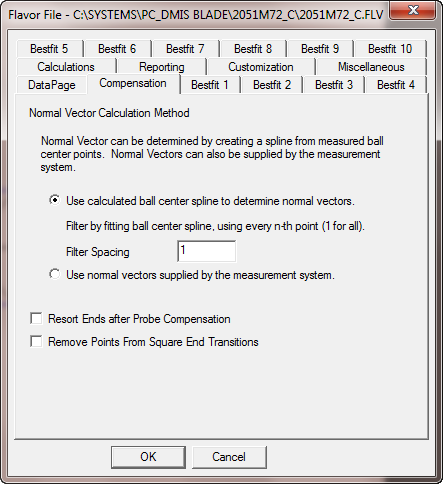
Use the Compensation tab in the Flavor file dialog box to specify how normal vectors are calculated. Vectors can be determined by compensating for the probe ball radius or by using the normal vectors established by your measuring system.
Flavor File dialog box - Compensation tab
<<<<<<< HEADUse calculated ball center spline to determine normal vectors option - Removes the probe ball radius for the points specified in the Filter Spacing box to calculate the normal vectors for all points along the spline. This option can reduce the effect that poor surface condition can have on the compensated data.
Use normal vectors supplied by the measurement system option - Uses the normal vectors that your measuring system calculated.
Resort Ends after Probe Compensation check box - Instructs PC-DMIS Blade to take the points that define the end and sort them after the compensation. This attempts to remove any crossings that occur as a result of the compensation.
Remove Points From Square End Transitions check box - For square-end blades, a condition exists that does not occur for normal rounded blade ends. First, part of the point compensation involves trying to find which point on the nominal curve is representative of a point that is being compensated. When the point is found, PC-DMIS Blade borrows the K component of its normal vector and uses that as part of the compensation (see image below). For square ends, an abrupt change occurs when transitioning from the side to the end of the blade. But when the blade is scanned, the probe rotates around the sharp corner resulting in a round area in the ball center points as it scans around the corner. PC-DMIS Blade tries to figure out what the K component of these points are, but they really are not defined because of the abrupt nominal change. Remove Points From Square End Transitions instructs Blade to throw those points away and not attempt calculations with them.
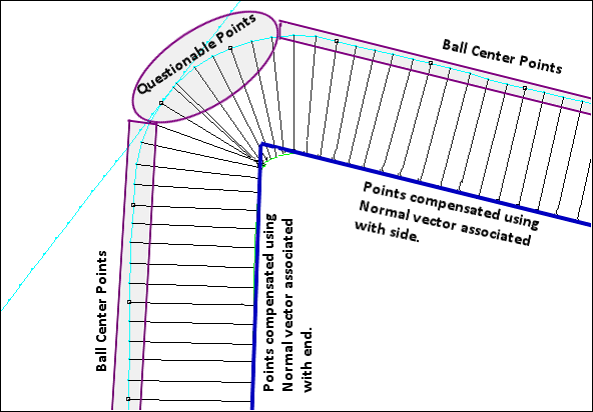
Example showing questionable points on a square-end blade