From the Edit window, make sure the cursor is at the end of the TIP/T1A90B-180 command.
Select Edit | Preferences | Parameters to open the Parameter Settings dialog box.
Click the Clearance Plane tab.
For the Active plane area, set the following items:
Axis to YMINUS
Value to -40
For the Pass through plane, set the following items:
Axis to XPLUS
Value to 100
Mark the Clearance planes active (ON) check box.
Click Apply and then OK to close the dialog box.
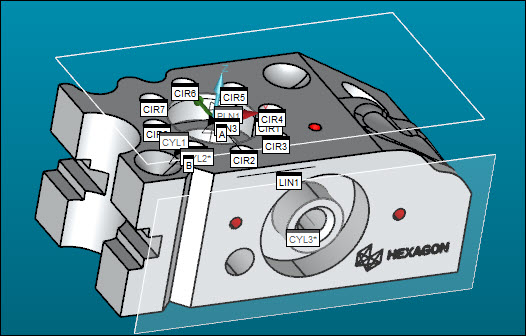
Click the Show Clearance Plane icon
( ) again to view the clearance planes. They should
look like this:
) again to view the clearance planes. They should
look like this: