PC-DMIS uses a browser-based HTML Help system. To launch the PC-DMIS Help file at any time in the Help viewer, you can do one of the following:
Double-click the PC-DMIS Help shortcut on your desk top that the PC-DMIS installer creates
From inside PC-DMIS, select Help | Index (or press F1)
The software tries to launch the most up-to-date version from the Internet. If the software cannot detect an Internet connection, it then attempts to open the Help file from a locally-installed version.
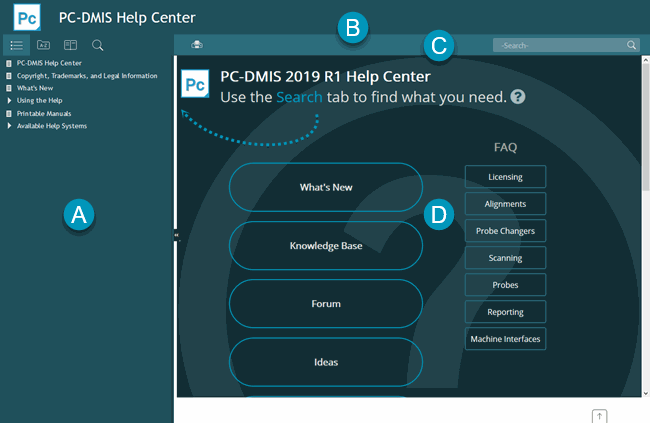
The PC-DMIS Help initially shows the Help Center introductory topic. This topic contains helpful links to external topics as well as FAQ topics:
The PC-DMIS Help File
Click Expand ( ) to show the Navigation
pane. This pane displays the following tabs that are used to help you
navigate, search for and filter topics. You can click Collapse
(
) to show the Navigation
pane. This pane displays the following tabs that are used to help you
navigate, search for and filter topics. You can click Collapse
( ) to hide the pane.
From left to right, this pane contains these tabs:

Table of Contents - This tab allows you to search by contents. See "Searching the Help by Browsing Contents and Topics".
Index - This tab allows you to search by an alphabetized index entry. See "Searching the Help with Index Terms".
Glossary - This tab displays descriptions of various terms used in the Help.
Filter - This tab allows you to customize the Help to better suit your needs so that you're not presented with so many topics when you browse through the Table of Contents or search the Help. See "Filtering Help Topics".
Search - This tab allows you to search for matching text. See "Searching the Help for Matching Text".
The Toolbar at the top of the Help viewer contains these buttons:

Print - This button lets you print the contents of the Topic pane. It displays a standard Print dialog box where you can choose the printer to accept the topic's content. This is good for quick printouts of a few topics.
Back / Forward - These buttons move back and forward through main sections (or chapters) of a Help file.
Search - This behaves the same as the Search tab. You can type a word or a series of words to search in the Help, and then click the search hourglass button to display relevant topics. See "Searching the Help for Matching Text".
The Breadcrumbs area exists between the Toolbar area and Topic pane:

The Breadcrumbs area is not shown on the main PC-DMIS Help Center page. The image above is to show the general location of the Breadcrumbs area on Help topic pages.
Breadcrumbs provide you with a hierarchal view of where the topic is in context with it's direct-line ancestor topics. This provides you with a convenient way of moving up to earlier parent topics within the topic's current tree level in the Table of Contents tab. You can click the Home link to go to the initial introductory topic of the current Help file.
The Topic pane is the main part of the Help. It displays the contents for the selected topic.