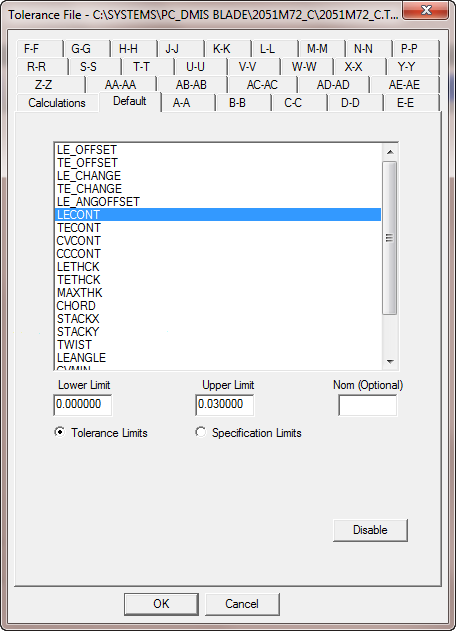
Use the Default tab in the Tolerance File dialog box to set the default tolerance values that apply to all sections unless you provide specific tolerance values for individual sections.
Tolerance File dialog box - Default tab
Lower Limit list - Sets the lower limit value for the selected Tolerance Limits or Specification Limits option.
Upper Limit list - Sets the upper limit value for the selected Tolerance Limits or Specification Limits option.
Nom (Optional) box - Sets the optional nominal value for the selected Tolerance Limits or Specification Limits option. If this box is blank, PC-DMIS Blade calculates a nominal value.
Tolerance Limits option - Applies the values that you entered for the Upper Limit and Lower Limit values to the tolerances.
Specification Limits option - Applies the values that you entered for the Upper Limit and Lower Limit values to the specifications.
Disable button - Disables the default settings.
Value 1 box - Applies the Value 1 option to the selection.
Value 2 box - Applies the Value 2 option to the selection. This option is usually related to an offset value.