Ring Gauge
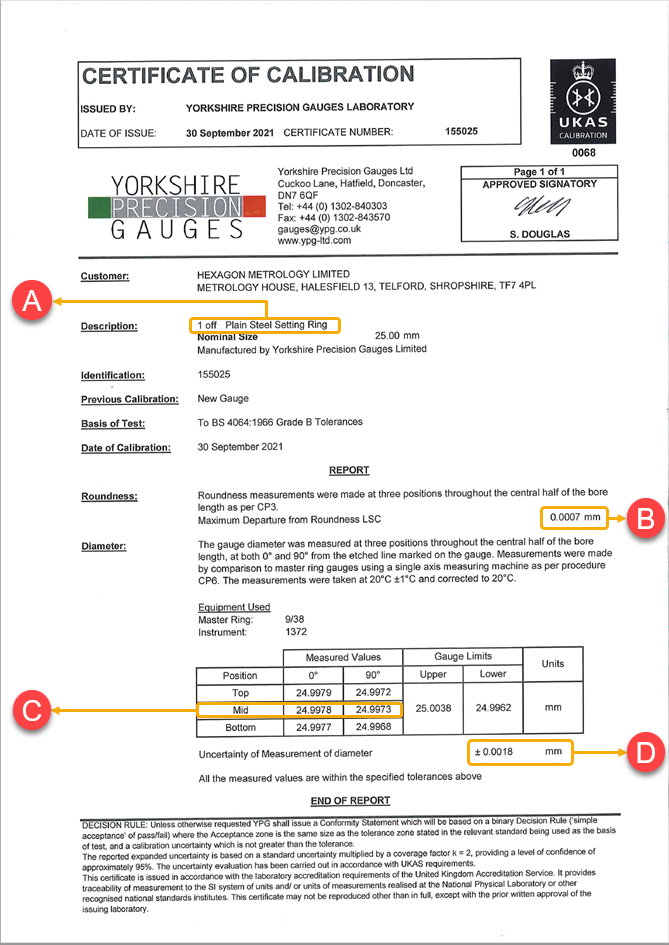
This shows a sample certificate of calibration for the ring gauge and how to locate the configuration data from the certificate.
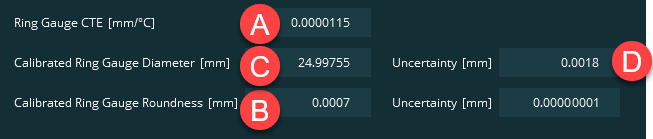
Ring Gauge CTE [mm/°C] - Locate the ring gauge's measurement's coefficient of thermal expansion (CTE) and type the calculated value in millimeters. Normally, the certificate states the CTE. In some cases, however, the certificate only lists the material type. In these cases, you need to look up the CTE for that type of material.
Suppose your certificate gives a description of "Plain Steel Setting Ring". This means the material type is steel.
Steel has a CTE of 11.5 parts per million per °C.
11.5/1000000 = 0.0000115 mm
The value you would type is 0.0000115 mm.
Calibrated Ring Gauge Diameter [mm] - Locate the measurements taken at the mid-height of the gauge. This is where measurement takes place in the Swift-Check routine. Where multiple values are stated for the same position, you need to average the results. Type the value in millimeters.
Suppose your certificate gives two measured values at the mid-position of 24.9978 at 0° and 24.9973 at 90°.
The average of these values is (24.9978 + 24.9973) / 2 = 24.99755 mm.
The value you would type is 24.99755 mm.
Uncertainty [mm] (for Diameter) - This box in the software is to the right of the diameter value. Locate the uncertainty of the diameter measurement and type its value here in millimeters.
Suppose your certificate states that the "Uncertainty of Measurement of diameter" is ± 0.0018 mm.
The value you would type is 0.0018 mm.
Calibrated Ring Gauge Roundness [mm] - Locate the roundness value and type it in millimeters.
Suppose your certificate states the roundness is 0.0007 mm.
The value you would type is 0.0007 mm.
Uncertainty [mm] (for Roundness) - In the software, this box is the right of the above roundness value. Locate the uncertainty of the roundness measurement and type its value here in millimeters.
In the above certificate, there is no value stated for the roundness uncertainty. This should not happen. If it does, try to reach out to the organization that provided your certification and ask them for the missing information.
Important
Swift-Check tests require non-zero values for its calculations. In cases where values are still missing, and you need to continue with your Swift-Check tests, here's a workaround to consider:
You can type a very-small non-zero number for the value, such as 0.00000001. This ensures that the effect on calculations is negligible.
In this case, the value you would type is 0.00000001 mm.
Example Values from Above Certificate