NC Gage Home Screen Overview
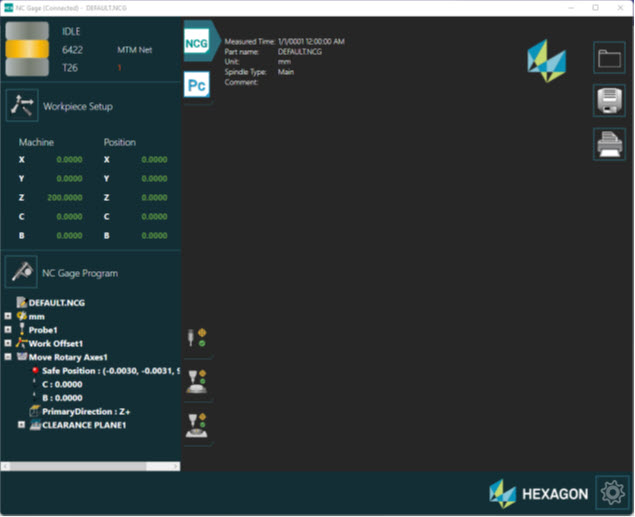
NC Gage Home Screen
Screen Layout | |||
|---|---|---|---|
Machine Status | Report Selection Status Icons | Report | Report and Program Tools |
Machine Counters and Work Offset Tools | |||
NC Gage Program / Details View | |||
Information Messages | |||
Function Menu | |||
Items on this screen | |
|---|---|
Screen Area | Description |
Machine Status | This area shows general information about the machine status which includes
|
Report Selection | This area provides you with buttons that you can use to select between various report views, such as:
|
Report Display | This area shows the report that you selected from the active NC Gage measurement program. |
Report and Program Tools | This area shows a set of Report and Program tools that you can use, such as:
|
This area displays the calibration status information for:
| |
Machine Counters and Workpiece Setup | This area shows the current machine position and a button to access the workpiece setup tools. |
NC Gage Program and Details View | This display changes depending on the selected report view.
|
Information Messages | This area shows informational messages. |
Function Menu | This is the main NC Gage function menu. |