Verify the Probe Macros
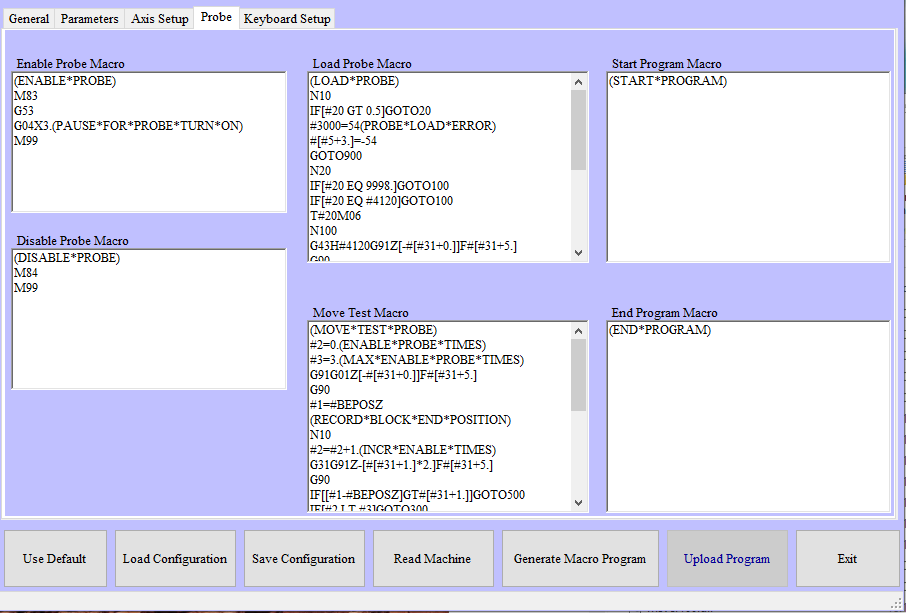
NC Gage Probe tab
You can use the Probe tab to configure sub-macros that NC Gage uses for monitor and automatic mode macros.
Required | |
|---|---|
Step | Instructions |
1 | Verify that the correct M-Codes are entered in the “Enable Probe Macro”
When macros are generated, the macro code here will appear in the macro O <Program Number> + 5 (ie. If the Program number on the Parameters tab is 7000, then the Enable Probe macro will be 7005) |
2 | Verify that the correct M-Codes are entered in the “Disable Probe Macro”
When macros are generated, the macro code here will appear in the macro O <Program Number> + 6 (ie. If the Program number on the Parameters tab is 7000, then the Enable Probe macro will be 7006) |
3 | Verify the macro to load the probe
When macros are generated, the macro code here will appear in the macro O <Program Number> + 7 (for example, if the Program number on the Parameters tab is 7000, then the Enable Probe macro is 7007) |
4 | The Move test macro is not normally required
When macros are generated, the macro code here will appear in the macro O <Program Number> + 8 (ie. If the Program number on the Parameters tab is 7000, then the Enable Probe macro will be 7008) |
5 | If any custom macro must be run whenever the NC Gage Macros start, add the macro code to “Start Program Macro”
|
6 | If any custom macro must be run whenever the NC Gage Macros end, add the macro code to “End Program Macro”
|