
2023.1 HxGN NC Server with NC Gage

Setting the Values on the Parameters Tab
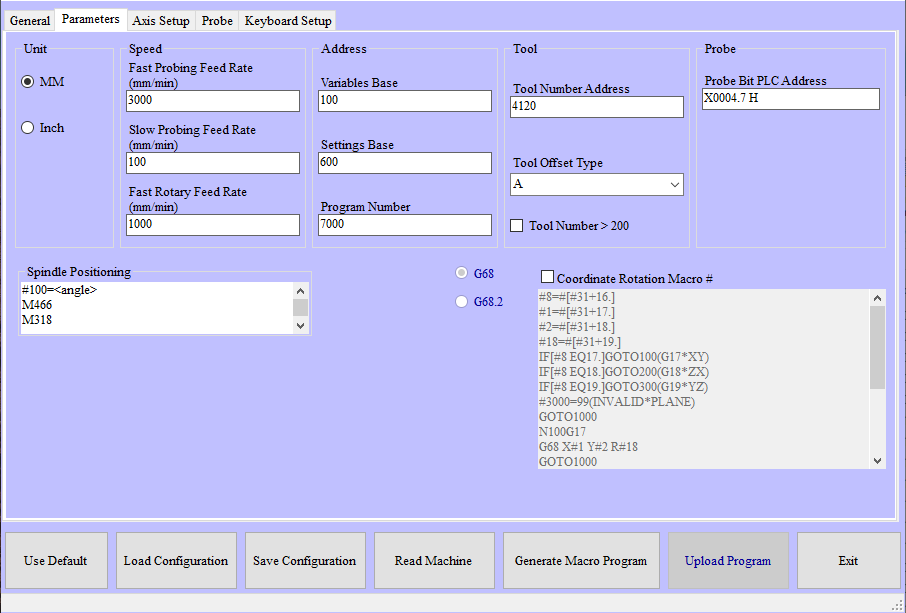
image399.png

NC Gage Parameters Tab

Required Parameters

Step

Instructions

1

Verify the operating units of the machine (Inch / mm)

2

Set the Speeds:

  • Fast Probing Feed Rate - Enter the max speed for moving between points

  • Slow Probing Feed Rate - Enter the speed for measurement

  • Fast Rotary Feed Rate - Enter the speed for rotating the rotary axes

3

Set the variable and program addresses:

  • Variables Base - Starting address for program variables (Allow 26 free consecutive variables!)

  • Settings Base - Starting address for settings variables (Allow 26 free consecutive variables!)

  • Program Number - Starting program number (Allow 10 free consecutive program numbers!)

4

Verify the Tool / Tool Table information:

  • Tool Number Address - Address of the active tool in the spindle

  • Tool Offset Type - Tool table type (Types A, B, C specify whether only geometry is stored in the tool table or if wear values are stored as well.)

  • Tool Number greater than 200 - Check this if the machine supports more than 200 tools

5

Verify the Spindle Positioning commands:

  • Spindle Positioning - These are the M-Code values that NC Gage requires to rotate the mill spindle to a specific angle. Be sure to include “<angle>” at the location where NC Gage expects an angle value.

  • Unclamp - This is the M-Code value that NC Gage uses to unclamp the mill spindle.

  • Clamp - This is the M-Code value that NC Gage uses to clamp the mill spindle.

Tip

You can leave the Spindle Positioning parameter field empty. This will disable the “Find Sphere” and “Find Ring” functions in NC Gage.

You can leave the Unclamp and Clamp parameter fields blank if your machine does not require them.

Optional Parameters

Steps

Instructions

Note

These items are not required for the operation of the software, but may be required for use with certain options or other systems.

1

Coordinate Rotation Macro - This defines the content of a user macro that you can use to update the coordinate rotation values with G11.