Machine Definition - Macro Tab
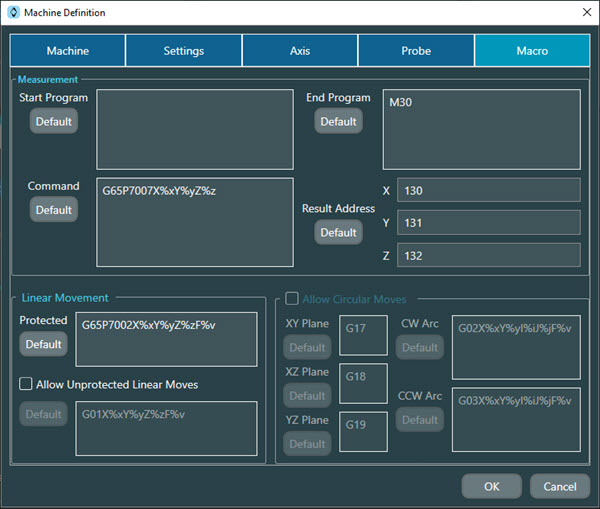
Most of the options on this tab are for Advanced settings only.
The options that are Advanced settings options are noted in their descriptions below.
Notice
For details on advanced features, please contact Hexagon Technical Support: https://support.hexagonmi.com/s/
Measurement area
Start Program - This area defines the macro code that NC Server inserts into the start of a CNC program.
End Program - This area defines the macro code that NC Server inserts into the end of a CNC program.
Command - This area defines the macro that NC Server uses to measure a point. This is an Advanced feature option and is not available for Mazak controllers.
Result Address - This box defines the address to get the X, Y, and Z measurement results from the CNC machine tool. This is an Advanced feature option and is not available for Heidenhain, Mazak, Okuma, or Siemens controllers.
Linear Movement area
Note
All options in the Linear Movement area of this tab are Advanced feature options.
Protected - This defines the linear move macro in Protected mode.
Allow Unprotected Linear Moves check box - Select this check box to enable unprotected linear moves. When this check box is not selected,
Allow Circular Moves area
Note
All options in the Allow Circular Moves area of this tab are Advanced feature options.
Allow Circular Moves check box - Select this check box to enable these options:
XY Plane - This box shows the G-code to select the XY plane. The default value is G17.
XZ Plane - This box shows the G-code to select the XZ plane. The default value is G18.
YZ Plane - This box shows the G-code to select the YZ plane. The default value is G19.
CW Arc - This box shows the G-code for the circular movement in the clockwise direction.
CCW Arc - This box shows the G-code for the circular movement in the counter-clockwise direction.