Machine Definition - Settings Tab
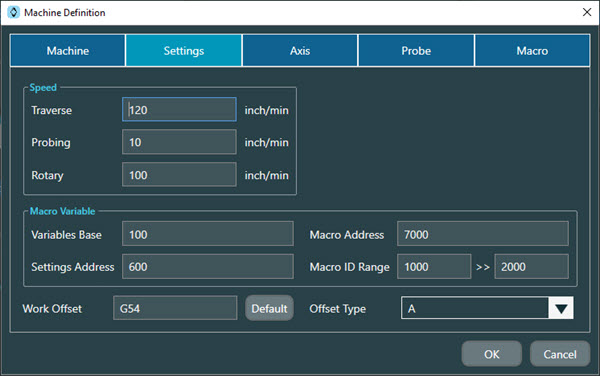
The Machine Definition dialog box showing the Setting tab for non-Heidenhain controllers
The Settings tab on the Machine Definitions dialog box provides settings that NC Server uses to generate macros, such as speeds and variables.
Speed area
Traverse - This defines the machine's maximum move speed in mm/minute or inch/minute, depending on the system units.
Probing - This defines the machine's probing speed in mm/minute or inch/minute, depending on the system units.
Rotary - This defines the machine's rotary speed in degrees/minute when the probe is in the spindle.
Trigger Signal area
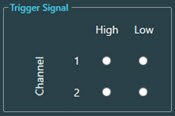
This area is only available when you select a Siemens controller as the Controller Type on the Machine tab.
Macro Variable area
Notice
This section is not available for the Heidenhain or Siemens controllers.
Variable Base - This is the starting value for local variables in CNC programs from NC Server.
Settings Address - This is the starting value for common variables that NC Server uses. This option is not available for Okuma controllers.
Macro Address - This is the starting value for system macros that NC Server uses.
Macro ID Range - This is the allowed range of macro numbers for CNC programs created by NC Server . This is an Advanced feature option. This option is not available for Okuma controllers.
Work Offset area
This area contains these options:
Work Offset - This defines the work offset to use at the beginning of a CNC program. This option is not available for Heidenhain controllers.
Offset Type - This option defines the tool table's offset type. This option is only available for the Heidenhain, Mazak, Okuma, and Siemens controllers.
The available options are:
A - The tool table only has one value per tool.
B - The tool table only has length and radius values.
C - The tool table allows length, radius, length wear, and radius wear values.
Use TOOLID check box - The option is only available for Okuma Multus controllers.
Use RTCP(TRAORI) check box - The option is only available for Siemens controllers.
Heidenhain Controllers
For the Heidenhain controller, the Settings tab has a different configuration. Since the name of the table and the primary key for the work offset table are not fixed, you need to assign these based on the configuration of the Heidenhain controller.
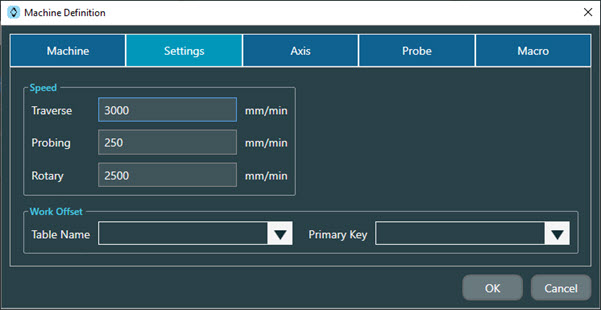
The Machine Definition dialog box showing the Setting tab for the Heidenhain controller
Along with the Speed section described above, the Settings tab for the Heidenhain controller has these Work Offset options:
Table Name - Select or type in the work offset table's table name. The drop-down list has built-in common options for the Heidenhain controller.
Primary Key - Select or type in the work offset table's primary key. The drop-down list has built-in common options for the Heidenhain controller.