NC Server Offline Manager Settings Dialog Box - Machine Tab
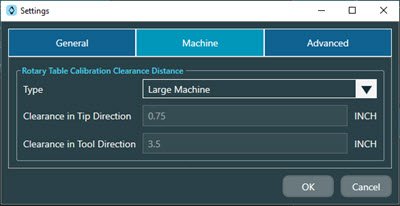
The Machine tab of the NC Server Offline Manager Settings dialog box contains these options:
Option | Description |
|---|---|
Type check box | This defines the type of machine you want to configure in NC Server Offline Manager. You can select from these options in the list:
|
Clearance in Tip Direction check box | NC Server Offline Manager uses the value you type in to define the tip clearance in the tip's direction. |
Clearance in Tool Direction | NC Server Offline Manager uses the value you type in to define the tool clearance in the tool's direction. |