NC Server Offline Manager Settings Dialog Box - Advanced Tab
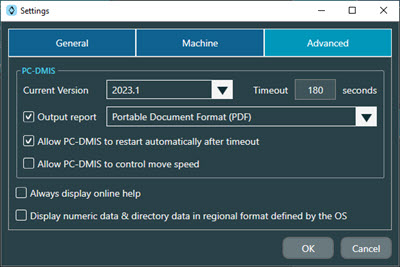
The Advanced tab of the NC Server Offline Manager Settings dialog box contains these options:
Option | Description |
|---|---|
Current Version | This area shows a list of all compatible versions of PC-DMIS that are installed on your computer. You can use any of these PC-DMIS versions with NC Server Offline Manager. NoticeThe software only lists versions of PC-DMIS installed on your computer that are compatible with the current version of NC Server Offline Manager. |
Timeout | This box displays the maximum time that NC Server Offline Manager waits for a response from PC-DMIS. If NC Server Offline Manager requests an action from PC-DMIS (such as analyzing data), and PC-DMIS does not respond within this timeout period, then NC Server assumes that PC-DMIS has hung or crashed. When this timeout expires, the software displays an error message that asks if you would like to restart PC-DMIS. |
Output report check box | You can select this check box to automatically create a report every time you perform an analysis. The available formats for the default report are:
|
Allow PC-DMIS to restart automatically after timeout check box | If you select this check box, when NC Server Offline Manager reaches the PC-DMIS Timeout value, NC Server Offline Manager attempts to restart PC-DMIS automatically without any user interaction. |
Allow PC-DMIS to control move speed check box | If you select this check box, PC-DMIS controls the move speed of your machine. |
Always display online help check box | Select this check box to always show the online help. This allows the help to always be available when you need it. |
Display numeric data & directory data in regional format defined by the OS check box | Select this check box to always show your numeric and directory data in the regional format defined by the computer's operating system. |