Overview
The Configuration (Config) Tool’s main screen consists of several tabs, a row of buttons, and a status line at the bottom of the screen
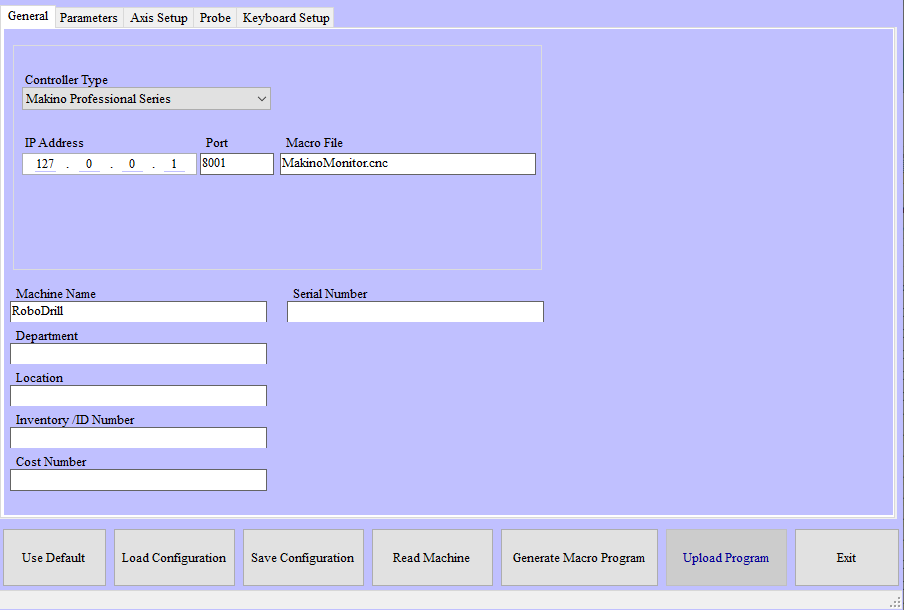
NC Gage Config Tool dialog box
 |
Tabs on the Config Tool dialog box
Config Tool Tab Details | |
|---|---|
Tab Name | Description |
General | General information about machine type, networking, and connection. |
Parameters | Operating parameters |
Axis Setup | Kinematic information for machine axes |
Probe | Sub-macro definitions for loading and enabling the probe |
Keyboard Setup | Colors and fonts for the on-screen keyboard |
USB Setup | Configuration of the OSP USB ports |
Config Tool Dialog Box Button Details | |
|---|---|
Button Name | Description |
Use Default | Restores the default values for all settings |
Load Configuration | Load a configuration from a file |
Save Configuration | Saves the data in the configuration |
Read Machine | Reads information from the machine for the configuration |
Generate Macro Program | Generates the necessary macros based on the configuration entered |
Upload Program | Not used |
Exit | Exit the Config Tool |