NC Server Machine Card
Machine Cards are the most prominent item on the main screen. The software displays a card for each machine that is defined in the NC Server configuration.
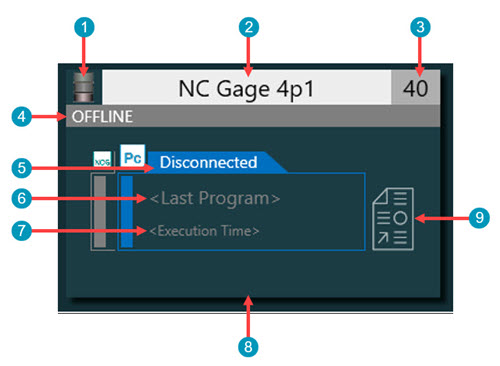
NC Server Machine Card example
NC Server Machine Card Layout | ||
|---|---|---|
Item Number | Item Name | Item Description |
1 | Connection Type | This area displays an icon that represents the type of connection to the machine. Currently, NC Server only supports these controller-dependent connection types:
|
2 | Machine Name | This area shows the machine's name. |
3 | Machine ID | This area shows the machine ID number. NC Server uses this ID when it communicates with the machine. |
4 | Machine Status | This area displays the machine status information. When you run NC Server, the software displays the current program that is running on the machine. If an alarm occurs while probing the part, NC Server displays the corresponding alarm message in this area. For details on machine status messages, see the Machine Tool Status Example table. |
5 | Measurement Status | This area displays the status of the machine. The status message depends on whether you are running PC-DMIS or an MTM server controller such as NC Gage. For details, see these tables below: |
6 | Last PC-DMIS Program | This area shows the name of the last PC-DMIS measurement routine that NC Server used to evaluate data from the machine. |
7 | Last Measurement Time and Date | This area shows the date and time of the last dataset that was evaluated by the machine. |
8 | Analysis Queue Size | This area shows if any data is waiting to be analyzed. If data is waiting on analysis, thin orange bars accumulate across this area. These represent the number of datasets in the queue for the machine to analyze. |
9 | Last Report | This button opens the last report that NC Server created for the selected machine. By default, NC Server automatically produces reports for every successful run of a measurement routine on each machine. If there is no report available for the last measurement routine that ran on the machine, the software opens the Open dialog box. You can control if reports are automatically created in the application Settings dialog box. For details, see "Settings". If you want to view reports prior to the last measurement report, you need to open them from the file system. These reports are in this folder: %ProgramData%\Hexagon\NC Server\CncMachineData\<Machine Name>\Reports Where <Machine Name> is the name of the machine as shown on the machine card. |
PC Measurement Status Examples
The table below lists a few status examples for the PC tab.
PC Measurement Status | Definition | Description |
|---|---|---|
Alarm | NC Server issues an an alarm status when an error occurs. You can find the details of the error in the Message area of the main screen. | Something occurred when processing the measurement data. NC Server displays an error message with an explanation. |
Analyzing | NC Server is analyzing the journal file. | NC Server is analyzing the journal file which contains the measurement data. |
Disabled | The machine connection has been disabled by the operator in NC Server. | The machine has the Disable check box set in its configuration. |
Disconnected | This status informs you that NC Server cannot connect to the CNC machine based on the current connection configuration. Possible causes may be that it cannot access the folder (File Channel), the internet is not available or the IP address or port assignments are incorrect. | If you are working with a file sharing connection, ensure that the file share is reachable from the NC Server computer and that the user has Administrator rights. Verify that the internet connection is available if needed and that the IP address and port assignments are correct. |
ProcessingIP | NC Server is processing the Inspection Plan (IP) file. | This status is to inform you that NC Server is processing the Inspection Plan's IP file. |
ReceivingData | NC Server is receiving a journal file. | This status is to inform you that NC Server is receiving a journal file for processing. |
Updating | PC-DMIS is updating an option on the CNC machine while processing the journal file. | When NC Server attempts to send data back to the machine tool to update a work offset, to update a tool, or to write a variable, the measurement status briefly changes to "Updating". |
Waiting | Journal file data has been collected and is waiting to be analyzed. | This status is to inform you that PC-DMIS cannot analyze the files immediately either because PC-DMIS has not yet started or is busy with another machine. The analysis is in the queue and will be processed as soon as PC-DMIS is available. |
MTM Server (NC Gage) Measurement Status Examples
The table below lists a few status examples for the NCG tab.
NC Gage Measurement Status | Definition | Description |
|---|---|---|
Alarm | An error occurred while processing the measurement data. | Something occurred when processing the measurement data. NC Server displays an error message with an explanation. |
Executing | A measurement program is running on the machine. | PC-DMIS is currently executing the measurement program. |
Idle | The machine connection has been disabled in NC Server. | The machine has the Disable check box set in its configuration. |
Manual | NC Gage or Smooth OMM is not on the home screen (DCM mode is not active). | The operator is likely using the software for manual operation. NC Gage does not work in DCM mode. |
Offline | The connection to the MTM Server (NC Gage) is not available. | Either NC Gage or Smooth OMM is not running on the machine, the MTM Net has not been configured, or the network is disconnected. |
Machine Tool Status Examples
NC Server shows the machine tool status in the top bar of the machine card.
Measurement Status | Definition | Description |
|---|---|---|
Alarm | An error occurred while processing the measurement data. | Something occurred when processing the measurement data. NC Server displays an error message with an explanation. |
Idle | The machine connection has been disabled. | A possible cause may be that the Disable check box is set in the machine's configuration. |
Offline | The connection to your machine is not available. | Possible causes are that the machine is not properly configured or the network is not available. |
Running | The machine tool is working. | There are no errors to report and the system is running without any issues. |