Machine Definition - Machine Tab
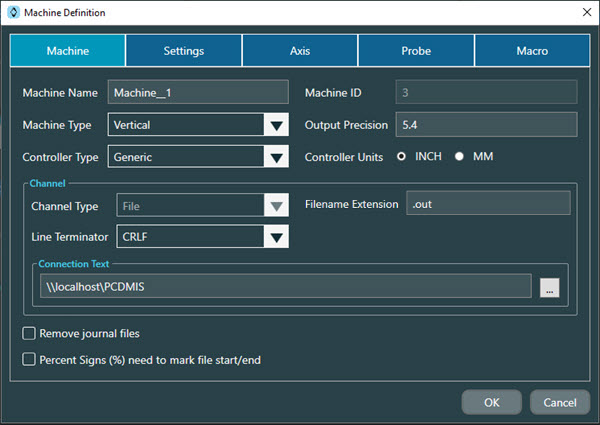
The following information provides a brief description of the Machine tab on the Machine Definition dialog box.
Notice
For details on advanced features, please contact Hexagon Technical Support: https://support.hexagonmi.com/s/
Machine Name - This is an editable field that you can use to type a recognizable name for the machine. This name appears at the top of the machine cards. This name also appears in the list of machines in PC-DMIS.
Machine ID - This is a read-only unique integer assigned to the machine in NC Server to identify the machine journal data.
Machine Type - This defines the type of machine in your system. The available options are Horizontal, Vertical, and Lathe. This is an Advanced feature option.
Output Precision - This defines the maximum number of digits and the number of decimal places for data precision of the displayed result.
For example, if you type "5.4", the "5" represents the maximum allowable number of digits of the displayed output value. The "4" represents the level of decimal precision of the displayed output value. In this case, for the Output Precision setting of 5.4, if your calculated value is "3.75", the displayed output value in NC Server would be "3.7500".
Controller Type - This shows a list of available controllers. You can select a controller from this list for the machine to use.
Controller Units - This defines the units (INCH or MM) that the controller uses when you run CNC programs.
Channel Type - This defines the connection type to the machine for data exchange.
Handshake Variables - This option is only available if you select Mazak or Mazak Integrex as your Controller Type and you select File as your Channel Type. Select the two handshake property values from each of the lists or use the default values.
Filename Extension - This defines the extension of the file that NC Server saves the data. This is only available for Haas controllers.
Line Terminator - Select an option from the list. The selected option is what is added to the end of each line of data read in before NC Server reads in the next line of data. In the above dialog box, CRLF is added to the end of each line of data which is a Carriage Return and a Line Feed. This is an Advanced feature option.
Connection Text - This defines the IP address and port assignment information that NC Server uses to connect to the machine.
Remove Journal files check box - This automatically deletes journal files after they are processed. This is an Advanced feature option.
Percent Sign (%) need to mark file start/end - This is an Advanced feature option and is not available for Siemens controllers.
Mazak Integrex Controller
If you select Mazak Integrex as your Controller Type, NC Server shows the Control Specific area with these options:
Using Second Head check box - Select this check box if your system will measure using the second spindle.
Has Lower Turret check box - Select this check box if your system is equipped with a lower tool turret.
Has Two Heads check box - Select this check box if your system is equipped with a second spindle.
Okuma Multus Controller
If you select Okuma Multus as your controller, even if you do not select the Advanced option, NC Server shows the Control Specific area with just a single option:
Has Lower Turret check box - See the description in the Mazak Integrex Controller section above.