Other Tabs – Keyboard Tab
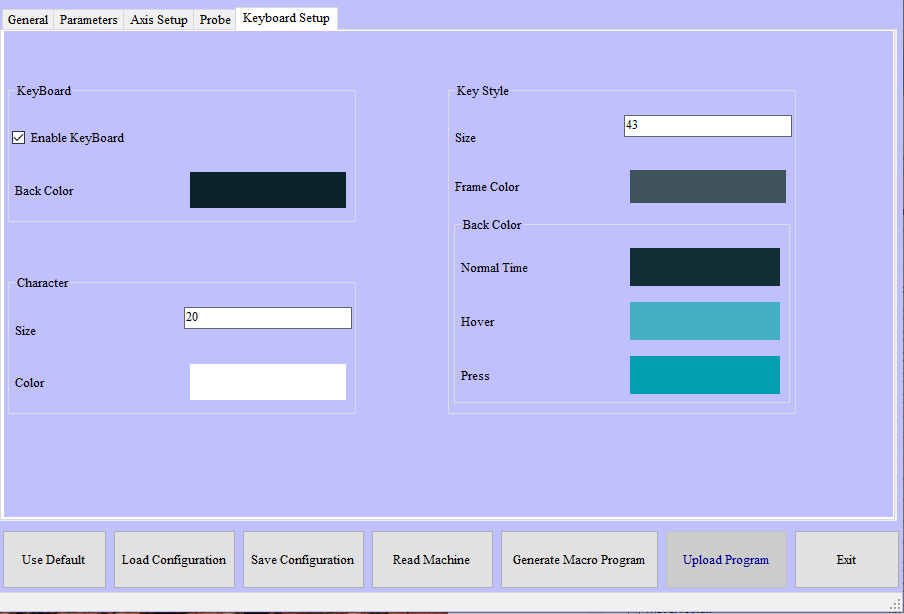
NC Gage Keyboard tab
The Keyboard tab allows you to customize the appearance of the onscreen keyboard, setting different colors for the keys, key borders, background color, key and font size.
Optional Customization Properties | |
|---|---|
NoteThese items are not required for the operation of the software, but may be required for use with certain options or other systems. | |
Enable Keyboard | This option allows you to turn the onscreen keyboard on or off. |
Back Color | This option allows you to define the background color of the onscreen keyboard |
Character Size | This option allows you to change the font size for the characters on the onscreen keyboard keys. |
Character Color | This option allows you to change the color of the characters on the onscreen keyboard keys. |
Key Style - Size | This option allows you to change the size of the onscreen keyboard keys. |
Frame Color | This option allows you to change the color of the border of the onscreen keyboard keys. |
Back Color - Normal Time | This option allows you to change the background color of the onboard keyboard keys. |
Back Color - Hover | This option allows you to change the background color of an onboard keyboard key when you hover over the key. |
Back Color - Pressed | This option allows you to change the background color of an onscreen keyboard key when you press the key. |