NC Server Offline Manager Settings Dialog Box - General Tab
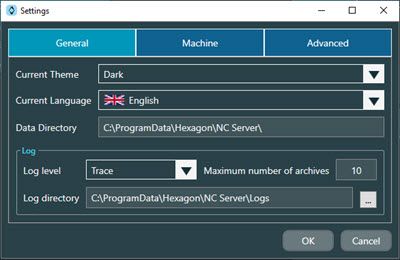
The General tab of the NC Server Offline Manager Settings dialog box contains these options:
Option | Description |
|---|---|
Current Theme | This option allows you to change from the standard Dark theme to the white background Light theme. |
Current Language | This list allows you to select the language for the NC Server Offline Manager user interface. |
Data Directory | This box displays the location of the root directory for NC Server Offline Manager data. You cannot edit the location in this box. It is for information purposes only. |
Log level | This list of options allows you to set the type of information you want to send to the log file:
|
Maximum number of archives | This is the maximum number of log files that the software archives. Once you exceed this number of archived log files, The software deletes the oldest archived log file before it saves a new archived file. |
Log directory | This is the location that NC Server saves log files. You can click the button with the three horizontal dots to the right of this box to navigate to and select a new folder. |